
A practice called us a few weeks after buying a pre-owned Dexis Platinum. Hardware error every time they went to capture an image. We replaced the sensor under warranty. Then the replacement started doing the exact same thing.
Two different sensors, one identical failure. When that happens, the sensor stops being the suspect. Something in the room is doing this.
When the Replacement Fails Too, Stop Blaming the Sensor
One sensor fails and sure, sometimes you just got a bad one. That happens with any piece of hardware. But when a fresh replacement fails the same way in the same office, the odds of two separate sensor faults fall through the floor. The common thread isn’t the sensor. It’s everything the sensor is plugged into.
So our tech stopped swapping sensors and started looking at the setup.
What We Found at the End of the Cable
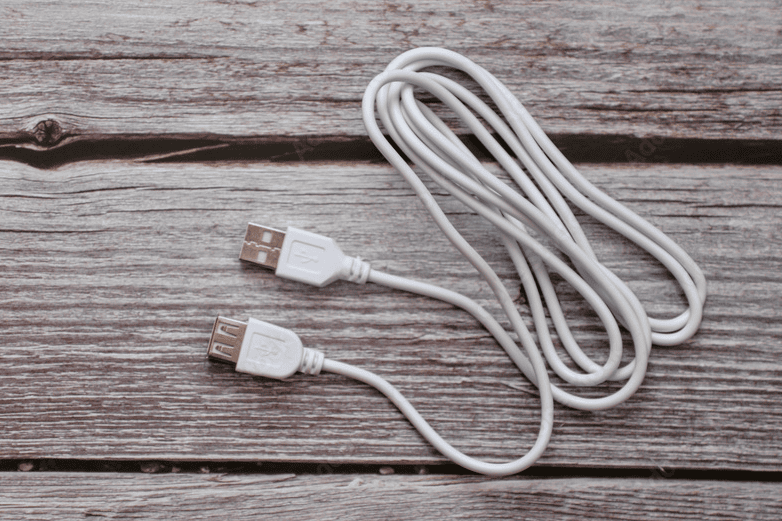
The sensor was running through a cheap passive USB extension cable. About 3 feet of A-to-A cable tacked on to reach the computer.
Here’s why that matters. Your Dexis Platinum already ships with a cable close to 10 feet long. USB can only run so far before voltage starts dropping off along the wire, and every extra foot of cheap cable and every extra connector you add makes it worse. The sensor pulls a real jolt of power every time it captures an image. Splice a bargain passive extension onto the end and the voltage sags before it ever reaches the sensor. The signal degrades. The sensor works for a while, then starts dropping mid-image.
This isn’t just us saying it. The people who make USB cables for a living spell out the same thing: the longer the run, the more the voltage drops before it reaches your device.
And it gets worse than glitches. Starve a sensor like that long enough and it can cook the internal voltage regulator. That’s the part nobody sees coming. The bad cable doesn’t just annoy you, it can damage the next sensor you plug into it. Which is exactly how one office turns into a two-sensor problem.
The proof is in the swap. Take the extension out, go straight into the computer, and the failure stops.
Duane, one of our support techs, had them pull the extension and plug the sensor’s own cable straight into the computer. Full mouth series, no drops, clean images. The same sensor everyone wanted to blame, working fine the second the extension came off.
We Don’t Guess, We Watch It Fail
This is the part I want you to take away, more than the hub even.
When your sensor acts up, the answer isn’t to keep throwing sensors at it. Our support team remotes into the machine and watches the failure happen live. We change one thing at a time. We plug the sensor straight into a port on the back of the computer, where the power tends to be most stable, and we see whether the problem follows the sensor or stays with the setup. Most of the time, the setup is the story: an unpowered hub, a port daisy-chained off a monitor, or a bargain extension cable nobody thought twice about.
That’s also why we stand behind these sensors with a protection plan, not just a warranty. A warranty covers defects. Our protection plan goes further: accidental damage and equipment failure both, no deductible, everything except loss or intentional damage. This office had one on their sensor, and it covered the replacement without a fight. Even so, we’d rather find the bad cable first and save you from burning through that replacement the same way you lost the first one.
The Fix Is Boring, and It Works
A powered USB hub. That’s the whole answer.
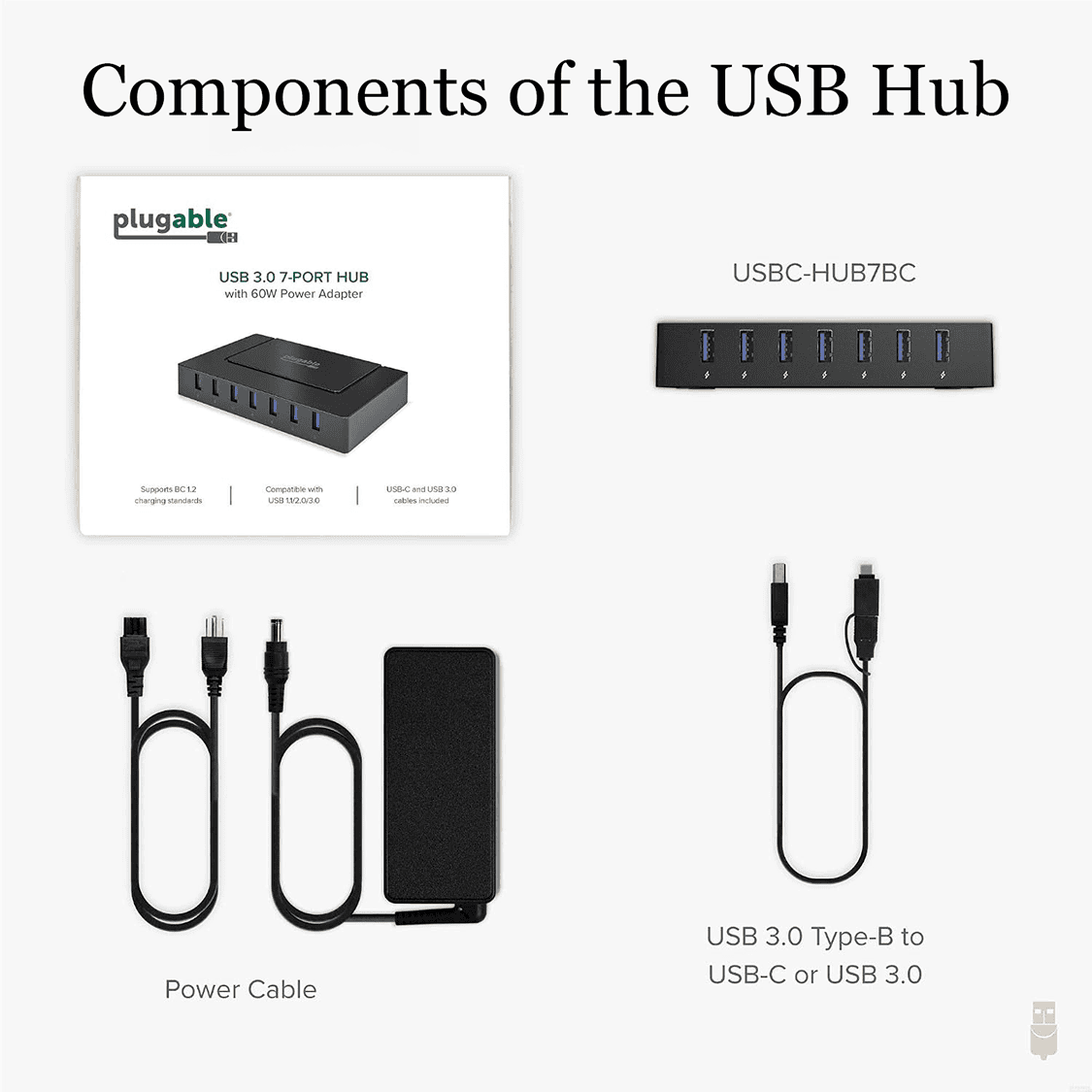
You plug the hub into the back of the computer, connect its own power adapter to the wall, and plug the sensor’s original cable straight into the hub. No extension anywhere in the chain. The hub hands the sensor its own clean, dedicated power instead of the scraps left at the end of a stretched-out run.
The one we recommend is the Plugable 7-in-1 USB 3.0 Powered Hub. Seven independently powered ports, a 60-watt adapter, plug-and-play with no drivers. We tested it before we put our name on it. For the labeled diagram and the click-by-click setup, we built a whole page for exactly that: the powered USB hub setup guide.
“But Our Other Sensors Run Fine on That Cable”
Sure. That’s the line we hear every single time, and it’s usually true, for now. The other sensors in that office are running on the same borrowed time. Voltage drop doesn’t take every sensor down on the same day. It picks them off one at a time, and the day it picks yours will never be a slow one. You’ll be mid-column on a busy Thursday with a patient in the chair.
A powered hub is cheaper than a repair ticket, and a lot cheaper than replacing sensors you cooked one cable at a time. If your sensor’s already acting up, we’ll tell you straight whether it’s the hub or the sensor. Bring us the symptom before you blame the sensor. The cable’s usually sitting right there in plain sight.


Leave A Comment
You must be logged in to post a comment.